
CabMasterPro User Guide
GigaDXF is a software application designed to import layered DXF files from CAD programs (such as AutoCAD or CabMaster) to create manufacturing list files and customised labeling for parts. It streamlines production by integrating with EzyNest / EnRoute Software for nesting, allowing for material, rotation, and quantity adjustments.

 Watch the Video to see how quick and easy it is to import DXF files and generate list files and labelling with GigaDXF Software.
Import and Convert:
Imports DXF files and converts them into machine-readable files, ensuring correct layers, thickness, and sizes are recognized by EzyNest.
Labeling and Identification
Generates detailed labels for each part, allowing for customisation with columns like "Job Number," improving production tracking.
Material and Part Management
Allows users to change materials, adjust rotation settings (e.g., for grain matching), and set desired quantities for parts.
Integration
Frequently used alongside CabMaster Software™ products for nesting and efficient CNC manufacturing.
GigaDXF uses a ribbon to display all the options and actions in the same way as CabMaster Software.
The ribbon contains three (3) tabs, the Home, Edit and Options, which are designed to help you quickly find the commands that you need to complete a task.

In the following example GigaDXF has been used to Import DXFs which can then be used to generate list files for batch importing of jobs with EzyNest AutoToolPath feature and create labelling for part manufacturing. This can be used with any CNC machine, saving a lot of time by automating toolpathing.
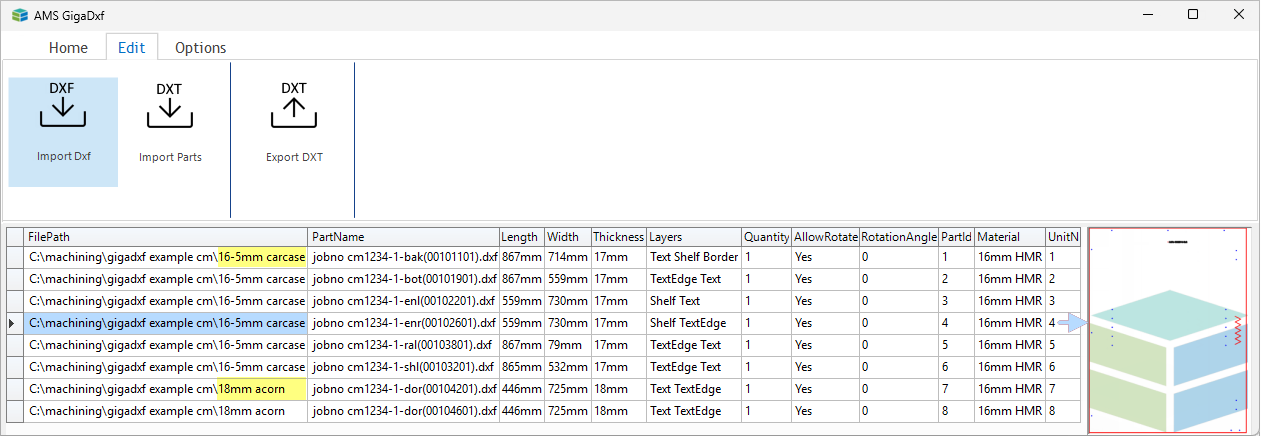
Click to view Import details from CabMaster Software
This video demonstrates GigaDXF for importing DXF files for production processing through EzyNest Software. [2:30 mins]